
NewLine Login: Sign In Safely on Any Device
One account works across the desktop website, the Android and iOS mobile apps and the macOS desktop app — same email, same password, same balance synced in real time. This guide covers a clean sign-in, password recovery, account security and what to do if something goes wrong.
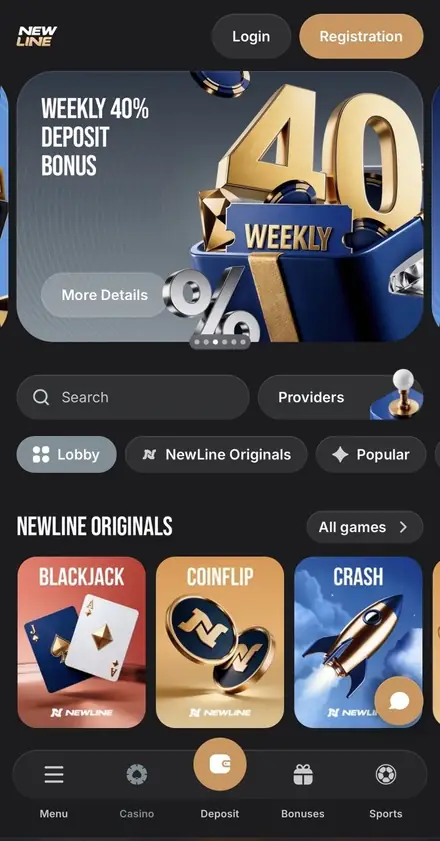
Logging in to NewLine is a single short flow on every platform — open the app or website, click Login in the top-right corner, type your email and password, confirm. Same account everywhere: your balance, active bonuses, NewLine Points loyalty progress and bet history are all synced through your single NewLine ID. This page walks you through that process step by step, then covers password recovery, account security (including the absence of 2FA, which makes a strong password non-negotiable), and what to do if you can't get in.
Ready to Sign In?
Click Login in the top-right corner of any NewLine surface — desktop, Android, iOS or macOS — and use your registered email and password. No promo code or device verification needed.
Open Login PageHow to Log In to Your NewLine Account
Open NewLine on your preferred device
Go to newlinecasinogames.com in your browser, or launch the NewLine Android, iOS or macOS app. Always confirm the URL before entering your password — it should match the official NewLine domain exactly.
Click the Login button
The Login button sits in the top-right corner on every page — transparent background with a thin border on desktop, the same position on mobile. Clicking it opens the sign-in modal.
Enter email and password
Type the email you used during registration and the password you set up. Watch out for autofill issues if you've reset the password recently — clear the saved password and re-enter manually if the form rejects you.
Confirm and you're signed in
Click Login. The platform validates your credentials and lands you in the casino lobby. Your balance, bonuses and Points are loaded automatically from the server — no manual refresh required.
What to Do If You Forgot Your Password
NewLine's password recovery flow is straightforward and doesn't require contacting support for the standard case. If you're locked out:
Click "Forgot Password" on the login screen
The link sits underneath the email and password fields. It's labelled clearly — usually "Forgot password?" or similar.
Enter the email address registered to your account
Use the exact same email you provided during registration. NewLine sends a password reset link to that address. If you don't see it within a few minutes, check your spam folder.
Open the link and create a new password
The reset link is single-use and time-limited. Click it as soon as you receive the email, then set a new password that's at least 8 characters with mixed case, numbers and a special character. Don't reuse a password from another site.
What if you no longer have access to the registered email? Contact NewLine's 24/7 live chat from the support icon on the website, or write to [email protected]. You'll need to verify ownership of the account through KYC documents — government-issued ID, proof of address and possibly transaction details. The platform will not change the registered email without thorough verification, which is a deliberate security measure.
Account Security: Why Your Password Is Your Whole Defence
One of the most important things to know about logging in to NewLine is what's not there. The platform does not currently offer:
- Two-factor authentication (2FA). No SMS codes, no authenticator app integration, no email verification on each login. Once you've registered, your password and your email are the only barriers between an attacker and your balance.
- Biometric login. No Face ID, Touch ID or fingerprint unlock on the mobile or macOS apps. Each app session uses the same email-and-password combination as the web version.
- Hardware security keys. No FIDO2, no YubiKey support.
This makes the security of your password and the security of your email account critical. A compromised email gives an attacker the password reset flow — they can request a new password without ever needing your old one. So protect both:
Strong Login Hygiene
A short checklist that significantly reduces the chance of unauthorised access.
- Use a long password — 12 characters or more — with mixed case, digits and symbols
- Don't reuse the password anywhere else; a leak from another site puts NewLine at risk
- Use a password manager to generate and store the password securely
- Enable 2FA on the email account linked to NewLine — that's the indirect protection
- Always confirm you're on the official NewLine URL before typing credentials
- Sign out on shared, public or work devices when you finish a session
- Review your bet history regularly for any activity you don't recognise
What Compromises Your Account
Each of these is a common path attackers use to take over gambling accounts.
- Reusing the same password across multiple sites
- Logging in over public Wi-Fi without a private connection
- Sharing your login with friends, partners or anyone else "just for a session"
- Saving the password in a browser on a shared computer
- Clicking a NewLine login link in an email or SMS — go to the official URL directly
- Using a temporary or abandoned email address as your registration email
- Ignoring suspicious login notifications from your email provider
Common Login Issues and How to Fix Them
Most failed-login problems trace back to one of a small set of causes. Run through them in this order before contacting support — most users find the solution in step 1 or 2.
| Problem | Likely Cause | What to Do |
|---|---|---|
| "Invalid email or password" | Typo, wrong account, browser autofill mismatch | Re-type credentials manually; if still failing, use the password reset flow |
| Login succeeds but features are restricted | Email not verified yet | Check inbox for the verification link sent at registration; click it, then log back in |
| Page won't load or login button does nothing | Stale browser cache, blocked scripts, cookies disabled | Clear cache and cookies, allow third-party cookies for the NewLine domain, try a different browser |
| "Access from your region is restricted" | VPN, proxy, TOR or accessing from a restricted jurisdiction | Disable any VPN/proxy. If you're in a restricted country, login is not permitted under the Terms & Conditions |
| Account closed message | Self-exclusion active, T&C violation, KYC failure, or account closed by user request | Contact support — different closures have different recovery paths (self-exclusion is irreversible for a minimum 6-month period) |
| Password reset email doesn't arrive | Wrong email, mail in spam folder, email account abandoned | Check spam, confirm the registered email is correct, then contact support with KYC proof of identity if needed |
| Login works on web but app says "wrong credentials" | Outdated app version, recent password change not synced | Update the app to the latest version, force-close and reopen, then re-enter credentials manually |
Logging In Across Devices: Web, Mobile App, macOS
NewLine uses a unified account model — one set of credentials covers everything. There's no separate app account, no separate macOS account, no different login for sportsbook versus casino. Here's how each platform handles login:
| Platform | Where the Login Sits | Session Behaviour |
|---|---|---|
| Desktop website (newlinecasinogames.com) | Top-right corner, transparent button next to Registration | Browser session — clears when you log out or wipe cookies |
| Android mobile app | Top-right header on every screen | Stays signed in until you tap Log Out or uninstall the app |
| iOS mobile app (iPhone, iPad) | Top-right header on every screen | Stays signed in until you tap Log Out or uninstall the app |
| macOS desktop app | Top-right corner of the app window | Stays signed in until you click Log Out or remove the app |
Because there's no 2FA, the apps don't ask for re-authentication once you've signed in. That's convenient for fast access, but it means anyone with physical access to your unlocked device can play on your account. Use a device passcode (iOS Face ID/Touch ID at the OS level, Android lockscreen, macOS login password) to keep the device itself secure.
What If You Want to Pause or Close Your Account
The Login page isn't only about getting into the platform — it's also where you'd start the process of stepping away. NewLine includes a self-exclusion option inside your account settings:
- Self-exclusion period: minimum 6 months. The platform locks the account, blocks new registrations from the same details, and refuses any login attempts during the period.
- How to activate: log in, open your profile settings and find the Responsible Gaming or Self-Exclusion section. Confirm the duration and submit. Once activated, self-exclusion cannot be reversed before the minimum period expires.
- Account closure: a separate option that fully closes the account. Available through the same Responsible Gaming section or by contacting support.
- Deposit limits: if you'd rather stay active but cap your spending, the same area lets you set daily, weekly or monthly deposit limits — those are reversible but with a built-in cooling-off delay.
If you ever feel that gambling has stopped being entertainment, log in once to set a self-exclusion or contact support — and consider reaching out to a recognised support service like GamCare, Gambling Therapy or Gamblers Anonymous.
Logging Out Cleanly
When you finish a session, especially on a shared or public device, log out properly:
Open the profile menu
Click your username or profile icon in the top-right corner of the website or app to expand the account menu.
Click Log Out
The Log Out option sits at the bottom of the menu. Confirming it ends your session immediately on that device — your other active sessions on different devices remain unaffected.
On a shared or public device, also clear cookies
After logging out from the website, clear your browser's cache and cookies for the NewLine domain. This removes any saved session data that someone could use to skip the login screen.
Frequently Asked Questions about NewLine Login
Click the Login button in the top-right corner of the NewLine website, mobile app or macOS app. Enter the email and password you used during registration and confirm. The same credentials work on every NewLine platform — your balance, bonuses and bet history are synced across all devices in real time.
On the login screen click the Forgot Password link, enter the email address linked to your account and submit. NewLine sends a password reset link to that email — open the message, follow the link and create a new password. The reset link is single-use and time-limited, so use it as soon as you receive it.
No. NewLine does not currently offer two-factor authentication, biometric login or fingerprint unlock on any platform — desktop, mobile app or macOS. Account security relies entirely on your password and the email address linked to your account, so use a strong unique password and protect access to your inbox.
No. NewLine's Terms & Conditions strictly prohibit logging in or playing through a VPN, anonymous proxy, TOR or any service that masks your real location. Doing so is treated as a serious violation and can result in account closure and confiscation of bonus winnings. Always log in from your real location with a standard internet connection.
Common reasons include a typo in your email or password, an unverified email address, an active VPN or proxy connection, an account closed for Terms & Conditions violations, or active self-exclusion. Try the password reset flow first. If the issue persists, contact NewLine's 24/7 live chat support or email [email protected] with your registered email address.
No. NewLine uses a single account across the desktop website, the Android and iOS mobile apps, and the macOS desktop app. Log in with the same email and password on any device — your balance, active bonuses, NewLine Points loyalty progress and bet history are all synced in real time.
Open the profile menu in the top-right corner and click Log Out. On a shared or public device you should also clear your browser cache and cookies after logging out. The mobile and macOS apps remember your session by default — enable a device passcode and don't share your unlocked phone or laptop with others.
Support and Contact Channels
If anything blocks you from logging in and the steps above don't help, NewLine offers two main support channels:
- 24/7 live chat: open the support icon on the website or inside the app. The chat is available around the clock and is the fastest channel for login and account issues.
- Email support: [email protected] — for any account, KYC, payments or technical issue. Include your registered email address but never include your password in a support message.
For partnership or affiliate questions, NewLine maintains separate addresses ([email protected] and [email protected]), but for any login problem on a player account, [email protected] is the right destination.
Sign In and Get Back to Playing
Logging in to NewLine is intentionally quick: same Login button on every surface, same email and password, no extra factors to type in. The trade-off for that convenience is that your password matters more than at platforms with 2FA — so make it long, make it unique and protect the email it's tied to. If you ever can't get in, run through the common-issues list above before reaching out to support, and remember that the password reset flow handles most lockouts on its own.
NewLine accounts are personal — never share your login credentials with anyone, including friends, family, or anyone claiming to represent NewLine. The platform's support team will never ask for your password. If you suspect your account has been accessed without your permission, change your password immediately and contact [email protected]. NewLine is for players aged 18 and over. If gambling stops being entertainment, use the self-exclusion feature inside your profile (minimum 6 months) and consider reaching out to GamCare, Gambling Therapy or Gamblers Anonymous.Log In and Continue Where You Left Off
Sign in with your registered email and password — same account on desktop, Android, iOS and macOS. If you've forgotten your password, the reset flow takes a couple of minutes via email.
Log In to NewLine